Fun with Vectors
Programming just about any game at some point will require you to do some simple vector math. That is right I just said that horrid m word Math! So it really isn’t that bad of a word and the more you work with it the more comfortable you will become. Granted there are times it is hard to know when to use the right equation for the problem because there are just so many of them out there. What I find helps is first breaking the problem down into what is know and what is need for the end results.
Now then I did say we were going to have some fun with vector’s didn’t I. But first before we dive into Vector math we need to state the problem:
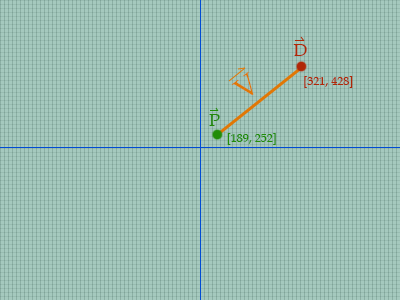
Player clicks using their mouse on a point in the game field where they want to explore.
To start we should break the problem down into what data do we need to figure out from the problem in order to solve it. By the basic idea is we want to travel between two points so we will need to figure out Point A and Point B. Point A is easy all we need is the player's current position which in many game engines would be a simple Vector class defining an X and Y coordinate.
For those really geeky mathematicians you might be saying hey wait a second that looks more like a point than a vector. You would be right it does look like a point but because Vector’s can be represented by an X and Y value that start from the origin we can use vectors to describe a lot of things. Plus most graphic cards really only want to know what position to draw a pixel in an (X, Y) paired value. This is really simplified because the video card does a lot of work with little appreciation from their users.
Back to the problem now. The first step we need to do is convert the mouse click into a Vector. There are several ways this can be done but for simplicity we will believe our game engine will provide us with the proper X and Y position like so:
ClickedPosition = (321, 428)
Note I have used parentheses to display the X and Y values of this point which is a common way to write this out on paper or the internet. Don’t get scared of this notion it just is easier to read and write. Now then since we know the destination point we need to know the starting point. The good news is most game objects have their current position stored in their data structure. So we will assume this is true and use an example point like:
PlayerPosition = (189, 252)
So now that we now have 2 Vectors we can do some really basic Vector math to figure out how to move from point A (PlayerPosition) to point B (ClickedPosition). So we need to figure out the difference between these two Vectors. To do this we will need to use the equation V2 - V1 and in this case we will be doing ClickedPosition - PlayerPosition. Going back to the Vector Definition it tells as in order to subtract two vectors you just need to match up the tuples. Uh oh I just used another nasty word but that is okay the tuples in this case are just the X and Y values of the vector. So here is the simple version of the equation:
DistVector = (321 - 189, 428 - 252)
DistVector = (132, 176)
So that wasn’t so bad. All I did was take the two X values and subtract them and do the same with the Y values. It is important to note I put the destination X and Y values first in the equation. Flipping them will give you a different result and give unexpected results in the game.
Now we have this thing called a DistVector what use is it to us? Well it is the vector we need to travel from our starting point and to the end point. We can now use this to figure out how many pixels in each the X and Y values we will need to travel each frame. Now we will need to know the Vector’s magnitude. To get this we can use the good old handy pythagorean's theorem which is on a right triangle we can use A2 + B2 = C2 and in this case we want to solve for C based from the X and Y values of our Distance Vector. This is what this equation will look like:
C2 = 1322 + 1762
C2 = 17424 + 30976
C2 = 48400
Remember we want to know C not C2 so we will need to take the square root of 48400. This happens to be 220 so now we know the magnitude of the Vector is 220. Or you can think of this as the length between the two points. With this we can now get the noramal vector of the DistVector by just dividing the X and Y values by the magnitude:
NormalVector = (132 / 220, 176 / 220)
NormalVector = (0.6, 0.8)
This is a lot of work and we still don’t know how to move from Point A to Point B right now! This is true but hey we are VERY close now so have a little patience. That and you have read this far don’t you really want to know the final answer? So here is is all we need to do now is set the veclocity for X and Y based on some speed value. So the final veclocity would be calulated by using the equation Velocity = NormalVector * speed. This now brings us to a new topic of how do we times a Vector by a scalar value. The easy answer is we just times each tuple by the scalar value. So here is the final math we need to do:
Speed = 5.0
Velocity = (0.6 * 5.0, 0.8 * 5.0)
Velocity = (3, 4)
Now we have the new velocity that we can iterate through until our player gets to their destination. We just need to tell the object that every frame we want to move left 3 pixels and move down 4 pixels. Here is a condensed version of the algorithm you will need to use.
Distance = ClickPosition - PlayerPosition
Magnitude = Square Root(Square(Distance X) + Square(Distance Y))
Normal = (Distance X / Magnitude, Distance Y / Magnitude)
Velocity = (Speed * Normal X, Speed * Normal Y)
Hope you find this equation helpful. Now then for those who are math geniuses. You should've recognized that in this paper I used a 3, 4, 5 triangle which made all the number nice and neat to work with.